
A laptop displaying an image with a blurred person arranging art in the background
Online visits are perfect for planning a real trip, studying, teaching, enjoying culture when you can't travel, or simply discovering art and history in a relaxed way. This guide explains the main ways to visit museums online and how to make virtual visits genuinely rewarding.
Way 1: Take Virtual Gallery Tours
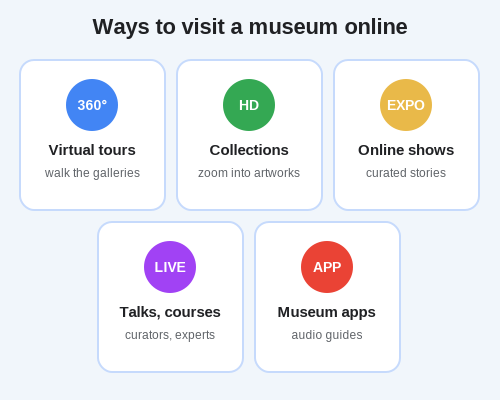
Many of the world's museums are open online
Many museums offer 360-degree virtual tours that let you move through their galleries as if you were there, often using the same technology as street-view maps. Platforms such as Google Arts & Culture host virtual tours of hundreds of museums and cultural sites worldwide, including well-known galleries, palaces, and historic buildings.
- Look for "virtual tour", "explore online", or "360" sections on museum websites.
- Use a computer or tablet for the best experience; a large screen helps you appreciate scale.
- Some tours work with virtual reality headsets for a more immersive experience.
- Click on artworks during the tour to see information and close-up images.
Way 2: Explore Online Collections
Most major museums publish searchable online collection databases, sometimes with hundreds of thousands of objects. Many offer high-resolution images you can zoom into, revealing brushstrokes, cracks in old paint, and tiny details invisible from a normal viewing distance.
- Search by artist, period, place, or theme to follow your interests.
- Read object descriptions for history, materials, and context.
- Check image rights: some museums release images of public domain works under open-access licences that allow free reuse; others restrict use. Always check before using images in your own projects.
- Create favourites or collections where the site allows, to build your own virtual exhibition.
Go beyond art museums
Natural history museums, science centres, archives, historic houses, and archaeological sites also offer virtual tours, 3D object scans, and digital exhibitions, from dinosaur skeletons to ancient manuscripts.
Way 3: Enjoy Online Exhibitions and Stories
Online exhibitions combine images, text, video, and sound to tell a story around a theme, artist, or historical event. They're often designed specifically for the web, so they can be easier to follow than wandering through a large virtual gallery. Many museums keep past exhibitions online long after the physical show has closed, giving you access to years of curated content.
Way 4: Join Talks, Courses and Apps
- Live and recorded talks: curators and experts give online lectures and gallery talks, many of them free.
- Video channels: museums share behind-the-scenes videos, conservation stories, and short introductions to famous works.
- Online courses: some museums partner with universities and online learning platforms to offer free or low-cost courses on art and history.
- Museum apps and audio guides: many can be used at home to hear the stories behind objects.
- Resources for families and schools: activity sheets, games, and lesson plans make online visits engaging for children.
Step 5: Plan a Rewarding Virtual Visit
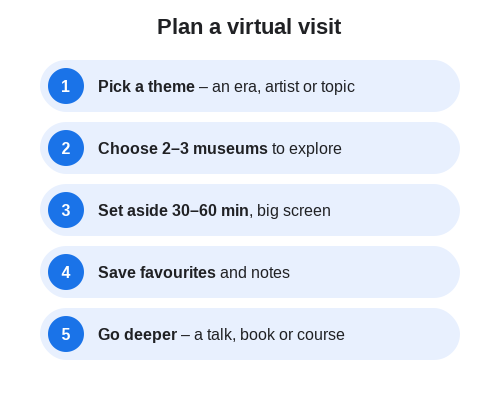
A little structure makes online visits memorable
- Choose a theme, such as Impressionist painting, ancient Egypt, or the history of your own city.
- Pick two or three museums with strong collections in that area.
- Set aside 30 to 60 minutes without distractions, and use the biggest screen you have.
- Spend time with a few works rather than rushing through hundreds.
- Save favourites and notes, and follow up with a talk, documentary, or book.
Virtual visits are also great preparation for a real trip. Exploring a museum online first helps you decide what to see and how long to spend there. Our guide on booking museum tickets explains the next step.
Share Virtual Visits With Others
Virtual museums can be a social activity. Explore together on a video call with friends or relatives in other places, host a family "museum night" with a theme and snacks, or use museum resources for home learning. Teachers and parents can set small challenges, such as finding an animal in five paintings or comparing two artworks from different centuries. Older relatives who find travelling difficult often particularly enjoy guided virtual tours.
Use official sources
Use museums' own websites and well-known cultural platforms. Be cautious of sites that charge for "exclusive virtual tours" of museums whose tours are free, or that ask you to download unknown software to view them.
Use Online Museums for Learning
Online collections are a powerful learning resource for students, teachers, and lifelong learners. Many museums provide free educational packs, lesson plans, and activity ideas aligned with school subjects like history, art, and science. Students can use high-resolution images and object records for projects, as long as they credit the museum properly.
For adult learners, following a theme across several museums, such as the history of a single art movement or civilisation, builds real understanding over time. Keeping a simple digital notebook of favourite objects and what you learned makes each visit more memorable.
Virtual visits are also a wonderful tool for accessibility, letting people who are unwell, have limited mobility, or live far from major cities explore world-class collections in comfort. Many museums add captions, transcripts, and audio descriptions to their online content, making it accessible to more people.
Combining online exploration with occasional real visits gives you the best of both worlds: the depth and convenience of digital collections, and the unforgettable experience of standing in front of an original work.
Final Thoughts
Visiting museums online opens up the world's art and history for free. Take virtual gallery tours, explore high-resolution collections, enjoy online exhibitions, and join talks and courses. With a theme, a little time, and a big screen, a virtual visit can be just as inspiring as a trip, and a great way to plan your next real one.