
A woman writes on a document clipped to a clipboard, with a laptop nearby on a wooden desk
The process is broadly the same in every country, whatever the service. This guide walks through it from finding the right website to keeping proof that you applied, so you get it right the first time.
Step 1: Make Sure You're on the Official Website
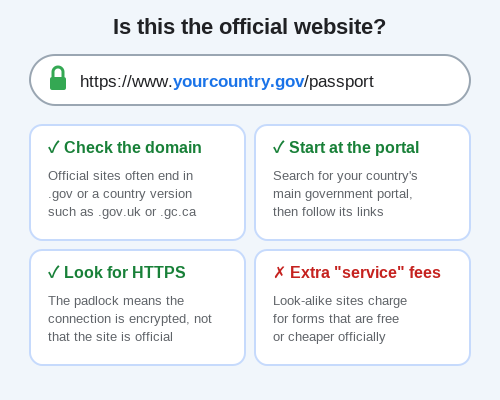
Always start from the official government site
Search results often show paid adverts and look-alike websites above the real government page. Some of these "help" sites charge extra fees for forms that are free or cheaper on the official site, and some collect personal data for misuse.
- Start from your country's main government portal and follow its links to the service, rather than clicking the first search result.
- Check the web address carefully. Many official sites use a government domain such as .gov, .gov.uk, .gc.ca, .gov.au, or .gov.in. Others use a country-specific address, so confirm it through the main portal if you're unsure.
- Don't trust the padlock alone. HTTPS only means the connection is encrypted; fake sites can have it too.
- Be cautious of "processing" or "service" fees on top of the official fee, unless the official site itself names an approved partner.
Our guide on avoiding government service scams covers the warning signs in more detail.
Step 2: Read the Guidance and Prepare Everything First
Most official services have a guidance page explaining who is eligible, which documents you need, what it costs, and how long it takes. Read it fully before you open the form. It often answers the question that would otherwise stop you halfway through.
Then gather what you'll need in one place:
- Identity details: national ID, passport, or other accepted ID, and the exact spelling of your name as it appears on it.
- Reference numbers: tax number, social security or national insurance number, previous application numbers, or vehicle details.
- Supporting documents: proof of address, certificates, or photos, scanned or photographed clearly.
- A payment method, if there's a fee.
- An email address and phone number you check regularly, since confirmations and requests for more information usually come this way.
Scanning tip
Scan or photograph documents flat, in good light, with all four corners visible. Save them in the file type and size the form asks for (often PDF or JPG under a set size), and give them clear names like "proof-of-address.pdf".
Step 3: Fill In the Form Carefully
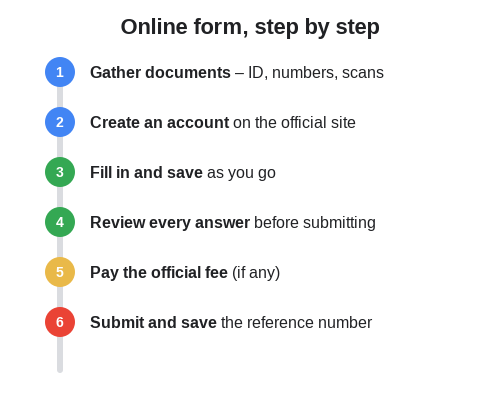
Six steps from preparation to proof
- Use a computer if you can. Long forms are easier to check on a bigger screen, and uploading files is simpler.
- Write names exactly as they appear on your ID, including middle names, and check the date format (day/month or month/day).
- Save as you go. Many forms time out after a period of inactivity. Use the save button or note your reference number.
- Answer honestly and completely. Giving false information on an official form can be a criminal offence, and missing details often cause refusals.
- Read help text next to questions; it often explains exactly what's needed.
Common Mistakes That Cause Delays
- Names or dates that don't match your ID or other records
- Blurry, cropped, or wrongly formatted document uploads
- Choosing the wrong form or service type, for example a renewal instead of a first application
- Leaving optional-looking fields blank when they apply to you
- Using an email address you rarely check and missing requests for more information
- Applying too close to a deadline or a travel date
Before you press submit, use the review page to read every answer once more, slowly. It's the cheapest way to avoid a rejection.
Step 4: Pay Safely, Submit and Keep Proof
- Pay only on the official payment page linked from the form. Never pay by gift cards, cryptocurrency, or bank transfer to a personal account.
- Save the confirmation page as a PDF or screenshot, and keep the confirmation email.
- Write down the reference number; you'll need it to track progress or contact the office.
- Keep copies of everything you uploaded.
- Track your application through the official site, and respond quickly if more information is requested.
Protect your account
Use a strong, unique password and turn on two-step verification if offered. Avoid public computers or public Wi-Fi for official applications, and always log out when you finish.
If You Get Stuck
If you can't complete a form online, you usually still have options. Most government services offer a helpline, live chat, or in-person help at a local office. Libraries and community centres in many areas provide free computer access and digital help. You can also ask a trusted family member to help, but don't share your login details or let anyone submit answers you haven't checked yourself.
If you have a disability or limited internet access, ask about paper forms or assisted digital support; many governments are required to offer alternatives.
Final Thoughts
Filling in government forms online is straightforward once you follow a routine: start from the official site, read the guidance, prepare your documents, fill in the form carefully, check every answer, pay only through official channels, and keep proof. Ten extra minutes of preparation can save weeks of delay.
Disclaimer
Waysily is an independent information website. We are not a government agency, we are not affiliated with any government, and we do not process applications or charge fees for any service. This guide gives general information only and is not legal, immigration, or tax advice. Rules, fees, and processing times differ between countries and change often, so always confirm requirements on your government's official website or with a qualified professional before you apply.