AI image generation sounds complex, but in reality it's much closer to giving instructions to a designer than learning any technical skill. If you can describe what you want in words, you can generate images.
Most people fail not because AI image tools are weak, but because they don't know how to describe ideas properly or how to improve results step by step. The gap between expectation and reality often comes from a misunderstanding of how these tools actually work.
This guide explains the full process in a simple, usable way. We'll walk through everything from understanding the basic principles to creating advanced prompts that produce exactly what you envision.
AI image tools work by turning text descriptions into visuals. These systems have been trained on millions of images and their associated descriptions, learning patterns and relationships between words and visual elements.
You describe:
- What the image should contain
- How it should look
- What style or mood it should have
The AI then creates an image based on patterns learned from millions of examples. It's not actually "thinking" or "understanding" in a human sense, but rather using complex mathematical models to generate pixels that match patterns it has seen before.
Important to understand:
- The AI does not "see" your idea
- It follows your words literally
- Clear instructions = better images
These principles are fundamental to getting good results consistently. The AI is a powerful tool, but like any tool, it works best when you understand its limitations and capabilities.
Before generating anything, answer one question:
Why do I need this image?
Different purposes need different descriptions. The context in which you'll use the image dramatically influences what makes it successful. A professional presentation needs different visuals than a social media post or a children's book illustration.
Different purposes need different descriptions. The more specific you are about your intended use, the better your results will be.
- Blog headers - need to be eye-catching but not overwhelming
- Product mockups - require clean backgrounds and realistic lighting
- Social media posts - benefit from vibrant colors and emotional appeal
- Concept art - allows for more creative and abstract elements
- Background illustrations - should complement without distracting
- Educational diagrams - need clarity and clear visual hierarchy
If you skip this step, results feel random. Taking a moment to define your purpose will save you time and frustration later, as you'll have a clearer vision of what you're trying to achieve.
You don't need many tools. One good tool is enough. The market is flooded with options, but most use similar underlying technology with different interfaces and specializations.
Popular AI image generators people use today include:
- ChatGPT image generation - integrated with text capabilities, convenient for all-in-one workflows
- Midjourney - known for artistic and stylized results, popular in creative communities
- DALL·E - excels at following detailed prompts and creating realistic images
- Stable Diffusion–based platforms - offer more control and customization options
All of them work on the same principle: prompt → image → refine. The key is not finding the "best" tool but becoming proficient with one that fits your needs and workflow.
The difference is mostly in style and control, not magic. Some tools produce more photorealistic results, while others excel at artistic styles. Choose based on your primary use case, but don't feel pressured to try them all.
Most bad images come from bad prompts. The quality of your output is directly proportional to the quality of your input. Learning to craft effective prompts is the single most valuable skill in AI image generation.
A strong prompt usually includes five parts, even if written naturally. These components work together to give the AI a complete picture of what you want.
1. Main subject
What is the image about?
This is the foundation of your image. Be specific about who or what your main subject is. Instead of "a person," try "a young woman with red hair" or "a golden retriever puppy."
Example: A young man working on a laptop
2. Environment or background
Where is it happening?
The setting provides context and mood. Be descriptive about the surroundings, whether it's a cozy coffee shop, a futuristic office, or a natural landscape.
Example: Sitting in a small café with warm lighting
3. Style or type
How should it look?
This determines the artistic approach. Different styles evoke different emotions and serve different purposes. Consider whether you need photorealism, illustration, or something more abstract.
Example: Realistic photography style, Illustration, Watercolor, 3D render
4. Mood or atmosphere
What feeling should it give?
The emotional tone of your image affects how viewers perceive it. Words like "serene," "dramatic," "playful," or "professional" help guide the AI toward the right atmosphere.
Example: Calm, Professional, Cinematic, Minimal
5. Extra details (optional but powerful)
Clothing, colors, camera angle, lighting, era.
These small touches can transform a generic image into something specific and memorable. They show the AI exactly what elements are most important to you.
Example: Soft sunlight from the window, shallow depth of field
Put together naturally, not like a robot list. The best prompts read like natural descriptions, with all these elements flowing together seamlessly.
You don't need technical language. The most effective prompts are written in natural, descriptive language that anyone can understand.
AI models are trained on human language, not technical jargon. They respond better to descriptions that paint a clear picture rather than lists of keywords or technical specifications.
Instead of:
"high resolution, ultra detailed, 8k, masterpiece"
These terms have become so overused that they often produce generic results. The AI doesn't understand what "masterpiece" means in any meaningful way.
Try:
"A clean, high-quality image that looks natural and well-lit, like a professional photo."
This describes the qualities you want in plain language that the AI can understand and apply to your specific subject.
AI responds better to clear meaning, not buzzwords. Focus on describing what you want to see, not on using "magic words" that you think will produce better results.
Your first image is rarely perfect.
This is normal. Even experienced users rarely get exactly what they want on the first try. The key is to treat AI image generation as a conversation rather than a one-time command.
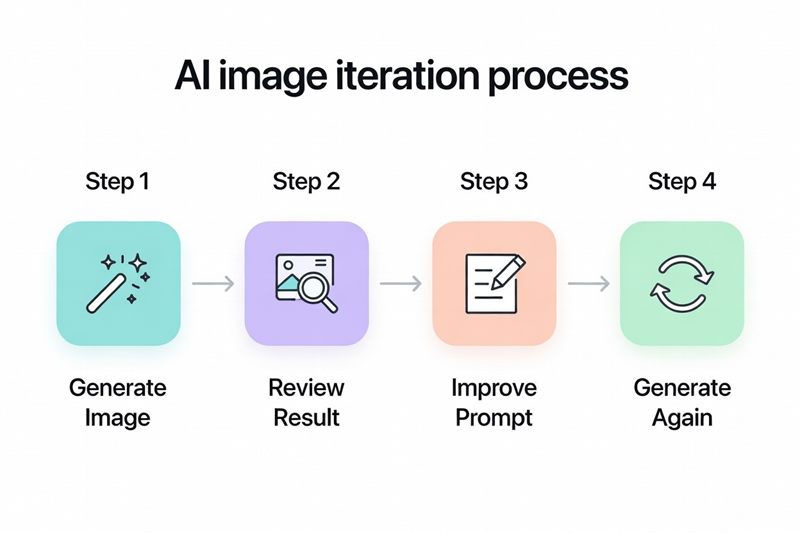
What professionals do:
- Generate an image
- Observe what's wrong
- Adjust the description
- Generate again
This iterative process is how you refine your vision. Each iteration teaches you more about how the AI interprets your words and helps you develop a more effective prompting style.
Examples of refinements:
- "Make the background simpler" - when the AI adds too many distracting elements
- "Change the color palette to neutral tones" - when colors are too vibrant or inconsistent
- "The face should look more natural" - when facial features appear distorted or artificial
- "Remove text from the image" - when the AI generates unreadable or incorrect text
AI image generation is iteration, not one-click magic. The quality of your final image depends on your willingness to refine and adjust until you get exactly what you want.
Instead of referencing real artists (which can cause ethical or policy issues), describe visual traits. This approach is more creative and avoids potential copyright problems.
Describing visual characteristics gives you more control over the final result while creating something unique rather than simply copying an existing style.
For example:
- "Soft pastel colors with hand-drawn lines" - creates a gentle, artistic feel without copying any specific artist
- "Clean flat design with bold shapes" - perfect for modern, minimalist illustrations
- "Photorealistic lighting and natural skin tones" - essential for portraits and realistic scenes
- "Minimalist illustration with simple shadows" - creates depth without complexity
This gives you control without copying anyone's style directly. You're creating your own aesthetic by combining elements in ways that haven't been seen before.
Even with good prompting techniques, you'll encounter common issues. Knowing how to address them will save you time and frustration.
Problem: Faces look strange
Ask for "natural facial proportions" to avoid distorted features
Avoid "hyper-realistic" unless needed, as this can create uncanny results
Reduce complexity in the scene to give the AI fewer elements to process
Consider using a reference image for particularly challenging facial expressions
Problem: Too many objects
Say "single subject" or "simple composition" to focus the AI's attention
Remove unnecessary background details by specifying "minimal background"
Generate elements separately and combine them using image editing tools if needed
Problem: Text in images looks wrong
Avoid text inside AI images altogether when possible
Add text later using design tools like Canva, Photoshop, or even simple online editors
If you must include text, keep it extremely simple and large
Problem: Image doesn't match imagination
Add one improvement at a time to understand what's causing the issue
Don't rewrite the entire prompt each time - make small adjustments
Try alternative phrasing if the AI consistently misinterprets certain terms
Consider breaking complex ideas into multiple simpler prompts
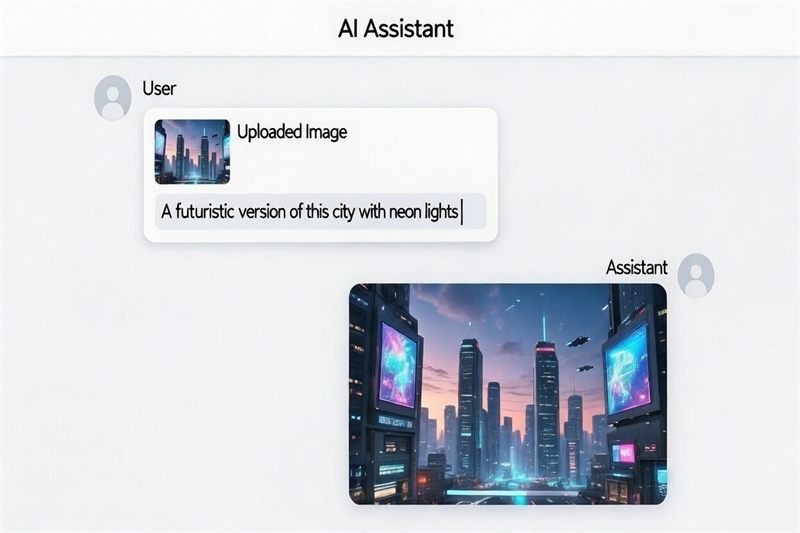
Many AI tools allow image uploads. This feature is incredibly powerful for getting specific results that might be difficult to describe in words alone.
Reference images act as visual anchors for the AI, giving it a concrete example of what you want to achieve. This is especially useful for complex compositions or specific styles.
You can:
- Upload a sample image to show the exact composition or style you want
- Ask AI to follow the layout or mood of your reference while changing the subject
- Combine reference + text description for the best of both worlds
- Use multiple reference images for complex scenes with multiple elements
This massively improves accuracy. Reference images reduce ambiguity and help the AI understand exactly what you're looking for, especially for visual elements that are difficult to describe precisely in words.
When you get a good result:
- Save the prompt in a dedicated file or note-taking app
- Note what worked well and what didn't
- Reuse it with small changes for similar projects
- Organize prompts by category for easy access later
This builds your personal image prompt library. Over time, you'll develop a collection of reliable prompts that consistently produce the results you want.
People who do this get better results faster over time. They learn from their successes and failures, creating a knowledge base that grows with each image they generate.
This practice also helps you identify patterns in what works with specific AI models, allowing you to develop specialized techniques for different types of images.
AI images are commonly used for:
- Blog headers - Create eye-catching featured images that summarize your content and attract readers. AI can generate visuals that match your article's tone and topic.
- Thumbnails - Design compelling thumbnails for videos or articles that increase click-through rates. Custom thumbnails stand out more than generic ones.
- Website backgrounds - Generate unique background images that enhance your site's visual appeal without distracting from the content.
- Concept visuals - Quickly visualize ideas for presentations, pitches, or creative projects before investing time in professional design work.
- Educational content - Create illustrations and diagrams that help explain complex concepts in a more engaging way than text alone.
- Social posts - Generate attention-grabbing visuals for social media that increase engagement and shares, especially for platforms that prioritize visual content.
- Mockups before real photoshoots - Preview how products or designs will look in different settings before arranging expensive photoshoots.
- Brand materials - Create consistent visual assets for marketing materials, presentations, and internal communications that align with your brand identity.
They are best used as supporting visuals, not replacements for everything. AI images excel at providing inspiration, filling gaps in your visual content, and speeding up the creative process, but they work best when combined with human creativity and judgment.
The most successful users understand both the capabilities and limitations of AI imagery, using it as a tool to enhance their work rather than replace human creativity entirely.
As AI image generation becomes more common, it's important to use these tools responsibly and ethically. Consider the implications of the images you create.
- Avoid generating real people without permission - Creating images of specific individuals without their consent can raise privacy and legal issues.
- Avoid copyrighted logos and brands - Using AI to replicate trademarked materials can lead to copyright infringement claims.
- Don't use AI images for misleading content - Be transparent about using AI-generated visuals, especially in contexts where authenticity matters.
- Check usage rights of the platform you use - Different AI tools have different terms regarding commercial use, attribution, and ownership of generated images.
- Consider cultural sensitivities - Be mindful of cultural appropriation or stereotypes when generating images of people from different backgrounds.
This keeps your content safe for ads and long-term use. Following these guidelines not only protects you legally but also helps maintain trust with your audience.
"A clean and friendly illustration of a person working on a laptop at home, with a simple desk, soft daylight, neutral colors, and a calm, modern feeling."
This prompt works well because it clearly describes the subject (person working on a laptop), the environment (at home), the style (clean and friendly illustration), and the mood (calm and modern). It gives the AI enough detail to work with without being overly restrictive.
No tricks. Just clarity. The best prompts are those that anyone could understand and visualize, regardless of their technical knowledge of AI systems.
Final Advice
AI image generation is not about:
- Finding the perfect tool
- Copying fancy prompts from others
- Mastering technical jargon or complex parameters
- Generating perfect images on the first try
It's about:
- Knowing what you want before you start
- Describing it clearly in natural language
- Improving step by step through iteration
- Learning from both successes and failures
- Developing your own style and approach
Once you understand that, AI images stop feeling random and start feeling useful. They become a powerful tool in your creative arsenal rather than a frustrating mystery.
The journey to mastering AI image generation is one of experimentation and discovery. Embrace the process, stay curious, and don't be afraid to make mistakes—that's how you'll develop the skills to create exactly what you envision.