People often open ChatGPT, type a quick question, and then feel let down by the answer. It's not that ChatGPT doesn't work — it's that most users don't know how to talk to it in the way it understands best.
Think of ChatGPT like a junior assistant — smart and fast, but needing clear direction. Once you learn how to give that direction, the quality of answers changes dramatically.
It doesn't "think for itself" or have awareness — but when guided well, it can do tasks that feel surprisingly intelligent. The key is to use ChatGPT as a helper, not an oracle.
A lot of people type something like: "Fix this problem" or "Write a thing for me" — and then expect perfection.
ChatGPT doesn't guess your intention — it responds to what you actually type. If your prompt is vague, the answer will be vague.
So the key to using ChatGPT well is good prompting.
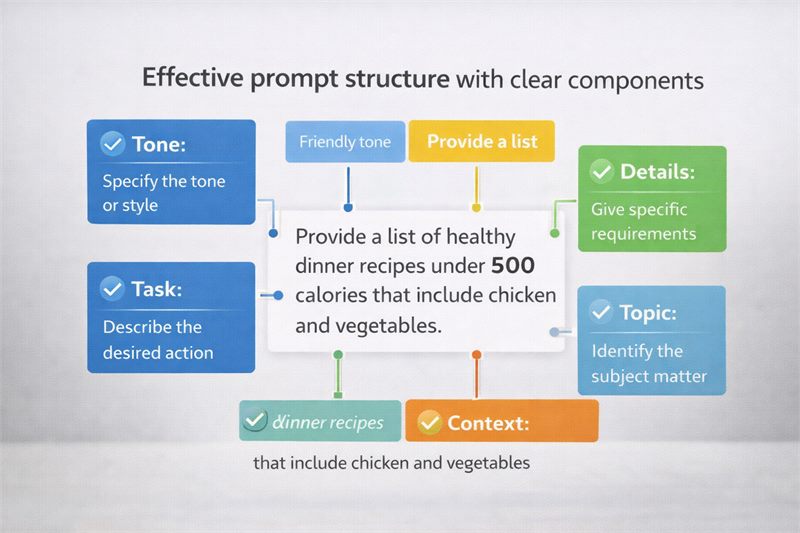
Getting better answers from ChatGPT starts with understanding how to structure your prompts effectively. The quality of your output is directly proportional to the quality of your input. When you provide clear, structured prompts, ChatGPT can deliver more precise and useful responses that match your specific needs.
Think of your prompt as a set of instructions
Instead of asking something broad, give context, task, and boundaries. Good structure:
Example Prompt
"You are a career coach. Write three concise LinkedIn headline options for a software engineer with two years' experience in Python and AI. Keep them friendly, results-focused, and suitable for a professional profile."
This yields much clearer results than a vague request.
A Practical Prompt Structure You Can Reuse
Template
"You are my assistant for this task. Write in clear, human language. Use short sentences and bullets where helpful. Ask me for missing details if needed."
This simple set of instructions alone can improve output quality significantly.
Work in Simple Loops (And Always Review)
A single prompt → single answer is rarely enough. Better approach:
For example: Have ChatGPT write a paragraph. Then ask: "Can you make this clearer?" Then ask: "What might be incorrect or missing?" This forces a second pass of thinking instead of one shallow answer.
Use ChatGPT for Thinking, Not Just Output
ChatGPT is very good at helping you think through a problem. You can ask:
In many cases, this is far more valuable than a one-shot answer.
Here's a simple, repeatable pattern that professionals use:
This keeps you from publishing raw AI text.
Use ChatGPT Across Daily Tasks
ChatGPT is not a one-size-fits-all tool — it's a multi-purpose assistant. You can use it to:
When you know what task you want ChatGPT to help with, you get far better results.
Here are general styles you can copy and adjust:
These are patterns, not exact commands — adapt them to your task.
Using prompts from others can speed you up. Here are some places that have good prompt collections you can adapt:
These aren't magic — each prompt still needs your context — but they give you a head start.
Here are the pitfalls most users fall into:
If you avoid these, your results improve immediately.
Ask the model to tell you what it is not sure about.
Example
"List anything in this answer that may be incorrect or outdated."
This surfaces uncertainty and forces you to check before using the output.
Treat ChatGPT as a helper that needs clear instructions
Don't expect perfect answers the first time
Use small loops of ask → refine → verify
Build simple workflows you reuse
Keep a personal prompt list you can copy and tweak
When you understand ChatGPT like that, it becomes surprisingly powerful