
Person using a TV remote control with a blurred television screen in the background
Streaming safely isn't complicated. A few settings and habits protect your account, your payment details, and your family. The tips below are written for Netflix but apply to almost every streaming service.
Step 1: Secure Your Login
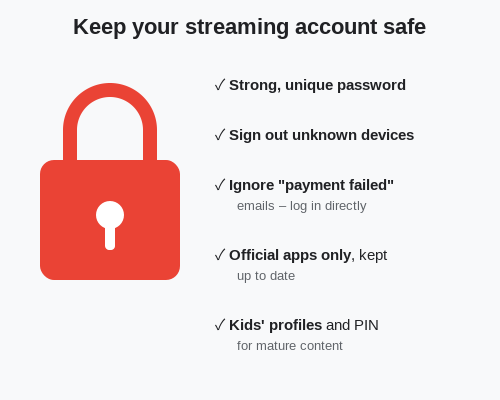
Five habits that protect your account
- Use a strong, unique password that you don't use anywhere else. When one website is breached, criminals try the same email and password on other services, a technique called credential stuffing.
- Use a password manager to create and remember strong passwords.
- Secure your email account too, with a strong password and two-step verification. Whoever controls your email can reset your streaming password.
- Keep your contact details up to date in your account settings, so security alerts and verification codes reach you.
- Don't share your password outside your household. Besides breaking most services' terms, every person who has it is another way it can leak.
Step 2: Recognise Fake Emails and Messages
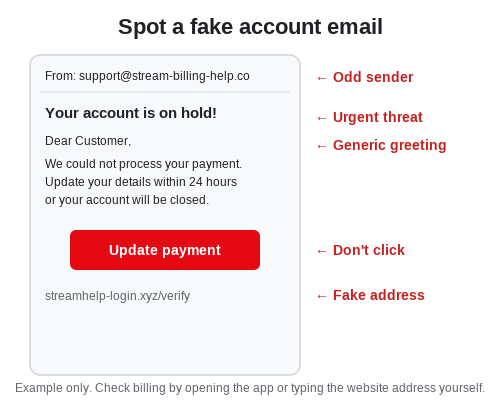
Phishing messages use urgency to rush you
- Check the sender's address carefully; scammers use addresses that only look similar.
- Be wary of urgent threats, generic greetings like "Dear customer", and spelling mistakes.
- Never click links in unexpected emails or texts about your account. Open the app or type the website address yourself and check your account there.
- Streaming services won't ask you to send card details, passwords, or verification codes by email, text, or chat.
- Report phishing messages to the service; many have an official address for this on their help pages.
Step 3: Manage Your Devices
Over time, an account can end up signed in on old phones, a friend's console, a hotel TV, or a holiday rental. Netflix and most other services let you see recent device activity and sign out of devices from your account settings.
- Review your recent devices and streaming activity every few months.
- Sign out of devices you don't recognise or no longer use, then change your password.
- Always sign out on shared or public devices, such as hotel TVs and rentals, before you leave.
- Before selling or giving away a TV, phone, or streaming stick, sign out of every app and reset the device to factory settings.
Signs your account has been accessed
Unknown profiles, shows in "Continue Watching" that nobody in your home watched, changed language settings, or emails about logins or plan changes you didn't make all suggest someone else has access. Sign out of all devices and change your password immediately.
Step 4: Set Up Profiles and Parental Controls
- Create separate profiles for each person, so recommendations and viewing history stay personal.
- Use kids' profiles for children; they only show content suitable for younger viewers.
- Set maturity ratings for each profile in your account settings.
- Add a profile lock or PIN to adult profiles so children can't switch to them.
- Block specific titles you don't want a profile to see, where the service allows it.
Talk to children about what they watch, too. Controls work best alongside open conversations about age ratings and what to do if something upsets them.
Step 5: Use Official Apps and Safe Networks
- Download apps only from official app stores or your TV's built-in store. "Modded" or "premium unlocked" apps offering free access are illegal and frequently contain malware.
- Keep apps and devices updated to get security fixes.
- Be careful with public Wi-Fi. Streaming itself is encrypted, but avoid logging in or changing payment details on networks you don't trust.
- Don't buy "cheap lifetime accounts" sold on social media or marketplaces; they're usually stolen and get shut down.
Keep Billing Under Control
Check your bank or card statements for streaming charges you don't recognise, and compare them with your plan. Review your plan once a year: you might not need the most expensive tier if you rarely watch on several screens at once, or an ad-supported plan might suit you better. If you pay through an app store, your phone provider, or a bundle, manage the subscription there rather than in the streaming app.
If you entered details on a fake site
Change your streaming and email passwords straight away, sign out of all devices, and contact your bank or card provider to block the card and dispute any charges. Watch your statements closely for the next few months.
Streaming Safely While Travelling
When travelling, use your own phone, tablet, or laptop rather than shared hotel TVs where possible, or remember to sign out before you leave. Download shows before you go so you are not relying on hotel or public Wi-Fi. Be aware that the catalogue can change by country, and that using tools to get around regional restrictions may break the service's terms of use. If you must log in on an unfamiliar device, change your password afterwards.
Back at home, check your account's recent device activity after any trip, and sign out of anything you do not recognise. It only takes a minute and keeps your account in your control.
Small routine checks like these, done a few times a year, stop most account problems before they start and keep your viewing history, recommendations, and payment details private.
Final Thoughts
Streaming Netflix safely comes down to a few habits: a strong unique password and secure email, ignoring links in account emails, reviewing signed-in devices, using profiles and parental controls, and sticking to official apps. Spend ten minutes on these settings today and you'll enjoy your shows with far less risk. If you're looking for free alternatives, see our guide on watching movies online for free legally.