
Close-up of condenser microphone with headphones in a music studio
Downloading episodes means you can listen anywhere without using mobile data or worrying about a weak signal. Most podcasts are free, and downloading them is simple once you know where to look. This guide covers phones and computers, automatic downloads, and keeping your storage under control.
Step 1: Choose a Podcast App
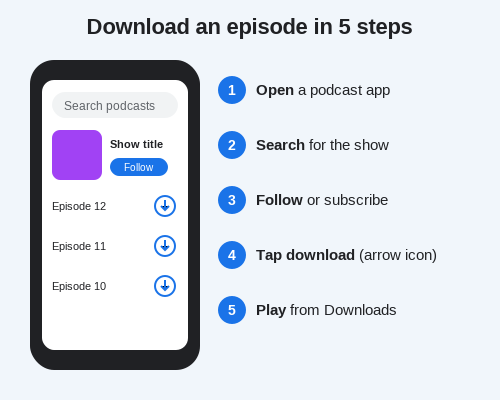
The process is similar in every podcast app
You need an app that can find, play, and download podcasts. Popular options include:
- Apple Podcasts: built into iPhones, iPads, and Macs.
- Spotify: carries many podcasts alongside music, including some exclusives, and lets free users download podcast episodes.
- YouTube Music and YouTube: host many video and audio podcasts.
- Independent podcast apps: such as Pocket Casts, Overcast (iPhone), and AntennaPod (Android, free and open source), which offer extra controls like playback speed, silence trimming, and detailed download settings.
- Broadcaster apps: many radio stations and public broadcasters have their own apps for their shows.
Most podcasts are distributed through open RSS feeds, so the same show is usually available in all apps. Pick the one whose design you prefer; you can switch later.
Step 2: Find and Follow Shows
- Search by show name, host, or topic.
- Browse charts and categories to discover popular shows.
- Ask for recommendations from friends or look for "best podcasts" lists from reputable publications.
- Follow or subscribe to shows you like. This is free and means new episodes appear in your library automatically.
- Listen to a few episodes before deciding; many shows take a couple of episodes to find their rhythm.
Where to start with a show
For story-based or serialised podcasts, start at episode one. For news, interview, or discussion shows, start with recent episodes or the ones with topics that interest you most.
Step 3: Download Episodes
On a phone or tablet, open the show, find the episode, and tap the download icon, usually a downward arrow or a cloud with an arrow. On a computer, most apps work the same way; you can also find many podcasts on their official websites with a direct download or "listen" link.
- Download on Wi-Fi to save mobile data, especially for long episodes or video podcasts.
- Check your app's "Downloads" or "Library" section to find downloaded episodes.
- Test playback in airplane mode before a trip.
- Some paid or premium podcasts require a subscription inside a specific app or a private feed link from the creator.
Step 4: Set Up Automatic Downloads
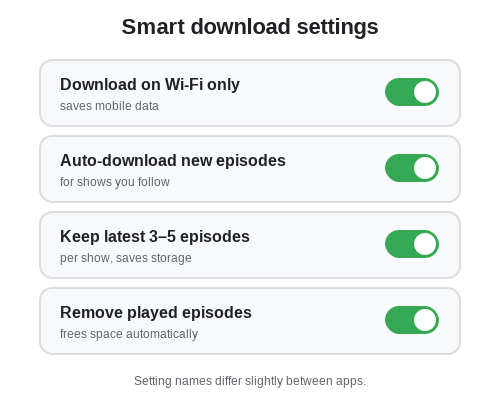
A few settings make podcasts effortless
- Download only on Wi-Fi to avoid surprise data charges.
- Turn on automatic downloads for your favourite shows, rather than every show you follow.
- Limit how many episodes are kept, such as the latest three to five per show.
- Remove played episodes automatically to free up space.
Note that some phones pause background downloads to save battery. If episodes aren't downloading automatically, check battery-saving settings for the app.
Step 5: Get More From Your Listening
- Adjust playback speed: 1.2x to 1.5x suits many talk shows; slow down for complex topics.
- Use a queue or "Up Next" list to line up episodes for a long journey.
- Set a sleep timer if you listen in bed.
- Use transcripts and chapters, available in some apps, to skim or jump to sections.
- Sync across devices by signing into the same app account, so you can continue on another device where you left off.
Listen Safely and Support Creators
Protect your hearing by keeping the volume at a moderate level, especially with earbuds, and take breaks during long listening sessions. Stay aware of your surroundings when walking, cycling, or driving; some people use one earbud or open-ear headphones for this. Many podcasts are free because of adverts or listener support. If you enjoy a show, leaving a rating, sharing it with friends, or supporting the creators directly helps it continue.
Be cautious with podcast "downloaders"
You don't need third-party "podcast downloader" software or websites. Official podcast apps download episodes for free. Unknown downloader tools may contain adware or malware.
Want music offline too? See our guide on listening to music offline.
Discover Podcasts You Will Love
Finding good podcasts can take time, because there are millions of shows. Start with a topic you already enjoy, such as a hobby, sport, or subject you studied, and search for it in your podcast app. Look at the app's editorial picks and category charts, but also read reviews and listen to a couple of episodes before deciding. If a show you like mentions other podcasts or has guests from other shows, follow those leads too.
Many podcast apps let you share episodes with a link that opens at a specific time, which is a great way to swap recommendations with friends. Building a small, varied library of shows you genuinely look forward to is better than following dozens you never listen to. Review your followed shows every few months and unfollow the ones you have stopped enjoying, so your downloads stay focused and your storage stays free for the shows that matter to you.
Libraries, universities, museums, and public broadcasters also publish excellent free podcasts on history, science, and culture, which are often well researched and advert-free. They are a good place to start if you want something informative and reliable.
Keep a short list of shows friends recommend, and try one new podcast each week; within a month or two, you will have a library of favourites that fits your interests and routine.
Final Thoughts
Downloading podcasts is simple: choose an app you like, follow the shows that interest you, tap download on episodes, and set up automatic downloads on Wi-Fi with sensible storage limits. With a few minutes of setup, you'll always have something worth listening to, wherever you are.