A smartphone with earphones playing a music playlist
This guide explains how to create playlists in any music app, how to choose and order songs, and how to keep them fresh, plus tips for sharing and collaborating with friends.
Step 1: Create a Playlist in Your App
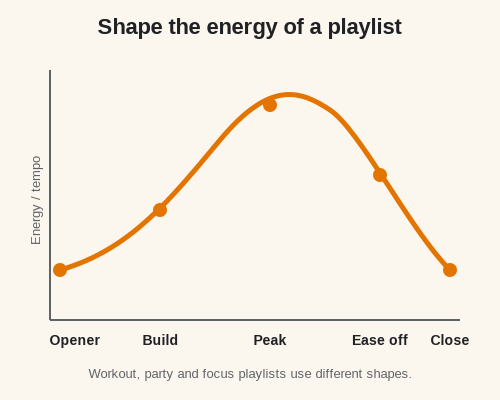
Good playlists have a shape, not just a list
Every major music app, including Spotify, Apple Music, YouTube Music, Amazon Music, and Deezer, works in a similar way:
- Go to your library and tap "Create playlist" or the "+" button.
- Give it a name; you can change it later.
- Add songs by searching, or use the menu next to any song ("…") and choose "Add to playlist".
- Drag songs to reorder them, usually by holding and moving the handle next to each track.
- Add a description and cover image if you want to share it.
If you use your own music files, most music player apps on phones and computers can create playlists too.
Step 2: Start With a Clear Purpose
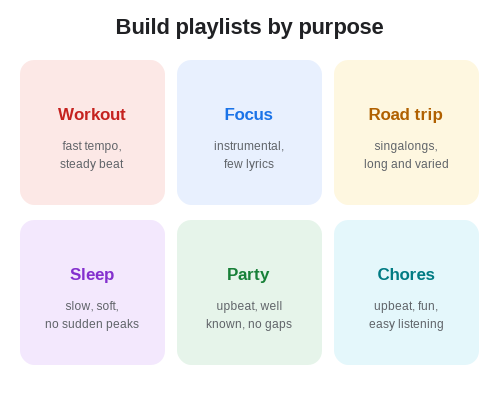
The purpose decides tempo, mood and length
- Workout: energetic songs with a steady, fast beat. Many runners look for songs with a tempo that matches their stride.
- Focus or study: instrumental music, ambient, classical, or lo-fi with few lyrics, which can be less distracting.
- Road trip: long, varied, and full of songs everyone knows and can sing along to.
- Dinner or relaxing: calm, warm songs at a volume that allows conversation.
- Party: upbeat, well-known tracks with few slow songs, especially in the middle.
- Sleep: slow, soft music without sudden loud moments.
Step 3: Choose the Right Songs
- Brainstorm widely first: add more songs than you need, then cut the weakest ones.
- Mix familiar and new: well-known songs keep listeners engaged; a few discoveries keep it interesting. A rough rule for shared playlists is mostly familiar with a few surprises.
- Avoid too many songs by one artist unless it's a deliberate tribute playlist. Spread them out.
- Consider the audience: for shared or family playlists, check lyrics and use the app's explicit content filter if needed.
- Use the app's suggestions: many apps recommend songs that fit a playlist based on what's already in it.
Think about length
Match the length to the activity: about 45 to 60 minutes for a workout, two to three hours for a dinner party, and longer for road trips. Most apps show the total playlist time at the top.
Step 4: Order Songs for Flow
The order of songs often matters more than the songs themselves. A good playlist has a shape, like a story with a beginning, middle, and end.
- Open strong but not at full energy: pick a song that sets the mood and draws listeners in.
- Build gradually: increase energy, tempo, or intensity over the first part.
- Place your best songs where they'll have impact, usually around the middle or peak.
- Make smooth transitions: avoid jumping from a very slow song to a very loud one, unless it's a deliberate surprise. Similar tempo, key, or mood helps songs flow.
- Wind down at the end for workouts (cool-down), dinners, and sleep playlists.
Some apps offer crossfade, which blends the end of one song into the start of the next. A few seconds of crossfade can make party and workout playlists feel seamless.
Step 5: Name, Share and Collaborate
- Give it a clear, memorable name that says what it's for, such as "Sunday Morning Coffee" or "5K Run, 30 Minutes".
- Add a short description and a cover image to make it easier to find and share.
- Share a link through messaging apps or social media.
- Make it collaborative so friends can add songs, ideal for parties, road trips, and group events.
- Choose public or private: decide whether a playlist appears on your profile, especially for personal or mood-based lists.
Keep Playlists Fresh
Playlists you use often can get stale. Every few weeks, remove songs you skip, add a few new ones, and try a different order. Some people keep a "new finds" playlist where they save songs as they discover them, then move the best ones into themed playlists later. Download your favourite playlists for offline listening before trips; our guide on listening to music offline explains how.
Playing music in public or at events
Personal streaming subscriptions are usually for private, non-commercial use. Playing music in a shop, café, gym class, or public event often requires a business music service or a public performance licence. Check the rules in your country before playing playlists for customers or the public.
Discover New Music for Your Playlists
Most music apps offer personalised mixes, radio stations based on a song or artist, and weekly discovery playlists. Save songs you like from these into a holding playlist, then sort them into your themed playlists later. Following other people's public playlists, including friends, artists, and music publications, is another easy way to find songs that fit your style.
You can also use the "song radio" or "similar artists" features on a track you love to quickly find related music. Shazam-style recognition apps help you save songs you hear in shops, films, or cafés straight to a playlist. Over time, these small habits make building and refreshing playlists effortless.
Finally, don't be afraid to delete or merge playlists you no longer use. A smaller library of well-made playlists is easier to enjoy than dozens of half-finished ones.
Final Thoughts
Great playlists start with a clear purpose, a careful choice of songs that mixes familiar favourites with fresh discoveries, and an order that builds and releases energy naturally. Name them well, share them with friends, and refresh them regularly, and your playlists will become the soundtrack people ask you for.