Minimalist photo of a smartphone with white earphones on a light background, plugged in
There are several legal ways to do this, each with its own advantages. This guide explains how offline listening works in streaming apps, how buying music files differs, how to manage storage and quality, and how to keep your downloads working.
Method 1: Download in a Streaming App
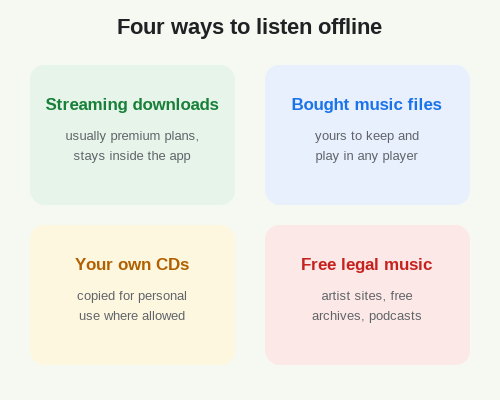
Choose the method that fits how you listen
Most major music streaming services, such as Spotify, Apple Music, YouTube Music, Amazon Music, and Deezer, let you download songs, albums, and playlists for offline listening, usually on paid plans. Some offer limited offline features on free plans, particularly for podcasts.
- Find the download option: open an album or playlist and look for a download icon, usually a downward arrow, or a "Download" toggle.
- Wait for the download to finish while connected to Wi-Fi. A filled or green arrow usually shows it's complete.
- Test offline mode: many apps have an offline setting that hides songs not downloaded, so you can check everything you need is available.
- Connect occasionally: streaming apps usually require you to go online every few weeks to keep downloads active, since they confirm your subscription is still valid.
Downloads from streaming apps are protected and can only be played inside that app. If you cancel your subscription, they stop working.
Method 2: Buy Music You Own
If you'd rather own your music, buy digital downloads from legitimate stores, such as the iTunes Store, Amazon's digital music store, or Bandcamp, which also passes a larger share of the money to artists. Bought music files, usually MP3, AAC, or lossless formats like FLAC, are yours to keep. You can copy them to your phone, computer, or music player and play them in any compatible app, with no subscription.
- Download your purchases and keep a backup on a computer or cloud storage.
- Transfer files to your phone using the store's app, a music app, or a cable.
- Use a music player app that supports your file format and organises tracks by artist, album, and playlist.
Method 3: Use Your Own CDs and Free Legal Music
If you have a CD collection, music software on a computer can copy (rip) tracks into digital files for your own devices. The law on copying CDs for personal use differs by country, so check what's allowed where you live. Free legal music is also available: many artists share tracks for free on their own websites, Bandcamp, or SoundCloud, and some online archives offer music that's in the public domain or under licences that allow free downloads.
Don't forget radio and podcasts
Many radio stations publish their shows as podcasts, and podcast apps can download episodes for free. Our guide on downloading podcasts explains how.
Step 4: Manage Storage and Sound Quality
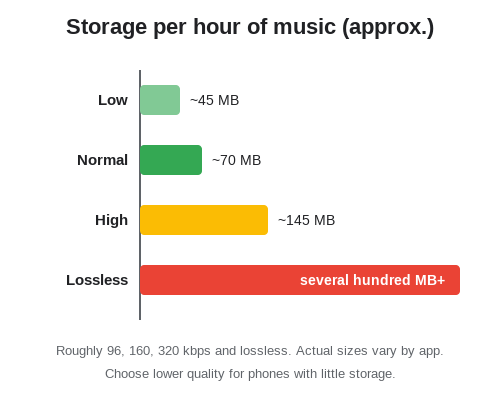
Higher quality uses much more space
- Check the download quality setting in your app and pick what suits your storage and headphones.
- If your Android phone supports a memory card, many apps let you save downloads there.
- Remove albums you no longer listen to, and use "smart" download features some apps offer to swap in fresh music automatically.
- Check your phone's storage settings to see how much space each app's downloads are using.
Step 5: Prepare Before You Travel
- Download playlists and albums at home on Wi-Fi a day or two before travelling.
- Open the app in offline or airplane mode to confirm everything plays.
- If travelling for a long time, connect to Wi-Fi occasionally so the app can verify your subscription.
- Pack wired headphones or charge wireless ones, plus a power bank for long journeys.
- Check whether your service works in the country you're visiting; some catalogues and features vary by region.
If you want variety, create travel playlists in advance; our guide on creating playlists has ideas.
Fix Common Offline Problems
- Songs won't play offline: the download may not have finished, or the app needs to reconnect to verify your subscription.
- Downloads disappeared: this can happen after logging out, reinstalling the app, changing devices, or exceeding the service's device limit.
- Some songs greyed out: tracks can be removed from a service's catalogue due to licensing changes.
- Phone storage full: lower the download quality or remove older downloads.
Avoid illegal "free MP3" and converter sites
Sites and apps offering free downloads of chart music or converting streaming videos into MP3 files usually break copyright law and the platforms' terms, and many are loaded with malware and misleading adverts. Stick to official stores and apps.
Offline Music on Other Devices
Many smartwatches can store music for runs and workouts without your phone, and some cars and dedicated music players support offline playlists too. Check whether your streaming app supports downloads on the device you want to use, as not every app works on every watch or player. For bought music files, almost any music player or car system that accepts USB drives or memory cards can play them.
Before a long trip, check that the battery and storage on whichever device you use are ready, and that downloads have finished while you still have Wi-Fi. A few minutes of preparation means your music will be there when you need it.
Final Thoughts
Listening to music offline is easy once you choose the right method: download in your streaming app for convenience, buy music you want to keep forever, use your own CDs where allowed, and explore free legal music. Manage storage and quality sensibly, prepare before trips, and your music will be ready wherever you are, with or without a signal.