
A family of five enjoying a cozy evening together on the couch, relaxing indoors
Signing up only takes a few minutes, but choosing the right plan, setting up profiles, and understanding billing can save money and avoid surprises. Plans, prices, and available content differ by country and change over time, so always confirm the details on the official Disney+ website or app for where you live.
Step 1: Check Availability and Devices
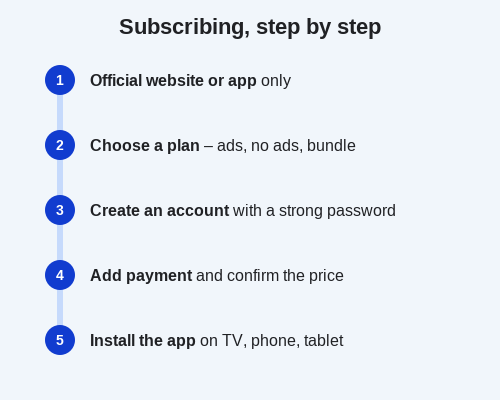
Five steps from sign-up to watching
- Check that Disney+ is available in your country on its official website. Catalogues vary between regions.
- Check your devices: Disney+ has apps for most smart TVs, streaming sticks and boxes, games consoles, phones, tablets, and web browsers.
- Check your internet connection: HD streaming generally needs a few megabits per second, and 4K needs considerably more.
- Browse what's included: look through the catalogue on the official site to make sure it has what you want to watch.
Step 2: Choose a Plan
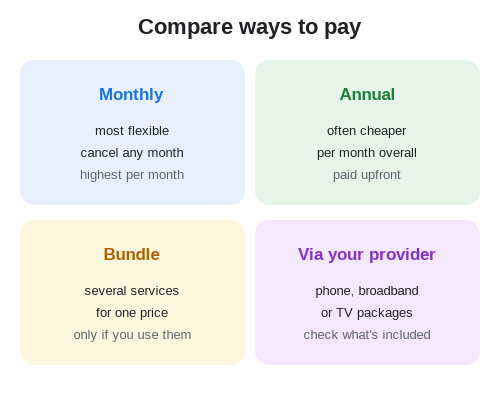
The cheapest option depends on how you watch
- Ad-supported plans are usually cheaper but include adverts, and may not allow downloads.
- Ad-free or premium plans remove adverts and usually add higher video quality, more simultaneous streams, and downloads.
- Annual billing, where offered, often costs less per month than paying monthly.
- Bundles, in some countries, combine Disney+ with other streaming services for a lower combined price.
- Deals through your provider: some mobile, broadband, and TV providers include Disney+ in their packages. Check your existing plans first.
Pick the plan for how you really watch
If you mostly watch alone on one TV and don't mind short adverts, a basic plan may be all you need. Families watching on several screens at once, or travellers who download shows, may get better value from a higher plan.
Step 3: Sign Up Safely
- Go directly to the official website by typing the address, or use the official app from your device's app store. Avoid links in emails, texts, or social media adverts offering "special deals".
- Create an account with your email and a strong, unique password.
- Choose your plan and billing period and check the price, including tax, before confirming.
- Add a payment method: card, PayPal, or other options depending on your country. You can sometimes subscribe through your app store, TV provider, or phone carrier instead.
- Save the confirmation email showing your plan and renewal date.
Beware of fake deals
Scam websites and social media posts often advertise "free Disney+ for a year" or "lifetime accounts" to steal card details or logins. Official promotions are shown on the Disney+ website or by your actual provider.
Step 4: Set Up Profiles and Parental Controls
- Create a profile for each person, so recommendations and "continue watching" lists stay personal.
- Use kids' profiles for younger children; they show age-appropriate content with a simpler layout.
- Set content ratings for each profile in the account settings.
- Add a profile PIN to adult profiles so children can't access them.
- Require a password to create new profiles, if the option is available.
Step 5: Start Watching on Your Devices
Install the Disney+ app on your TV, streaming device, or console, then sign in. Many TV apps show a code you can enter on your phone or computer, so you don't have to type your password with a remote. Use downloads on supported plans for flights and travel, and adjust video quality in the app settings if you're on mobile data. For a smoother picture, see the internet speed tips in our guide on streaming YouTube videos, which apply to any service.
Manage, Change or Cancel Your Subscription
- Change plans in your account settings; upgrades often apply straight away, and downgrades usually at the next billing date.
- Cancel anytime through your account on the website. You can usually keep watching until the end of the period you've paid for.
- If you subscribed through an app store or provider, cancel or change through them, not in the Disney+ app.
- Keep your account secure by reviewing devices and signing out of ones you don't recognise. Our guide on streaming Netflix safely has security tips that apply to every service.
To save money, some people subscribe for a few months when a series they like is released, then pause or cancel and return later. Check your renewal date in the account settings so you're not caught out by automatic renewal.
Sharing Within Your Household
Disney+ accounts are designed for one household, and the service has introduced rules in many countries to limit sharing outside the home, sometimes with an option to pay for an extra member. Check the current terms in your account settings before sharing with family members who live elsewhere. Within your home, each person can have their own profile, and the number of devices that can stream at the same time depends on your plan.
If several people in your home watch at once, check how many simultaneous streams your plan allows before choosing it. Downloads also count towards device limits on some plans. When travelling, you can usually keep watching on your own devices, but the catalogue may change depending on the country you are in, and some titles may be unavailable abroad.
Finally, think about how much you actually watch. Many households find that keeping one or two streaming services at a time and rotating them every few months gives plenty of choice while keeping monthly costs under control. Write down your renewal dates so you can decide each month whether to keep, pause, or switch.
Final Thoughts
Subscribing to Disney+ is quick: check availability, choose the plan that matches how you watch, sign up only through the official website or app, and set up profiles and parental controls for your household. Keep an eye on your renewal date and plan options, and you'll get good value from your subscription.