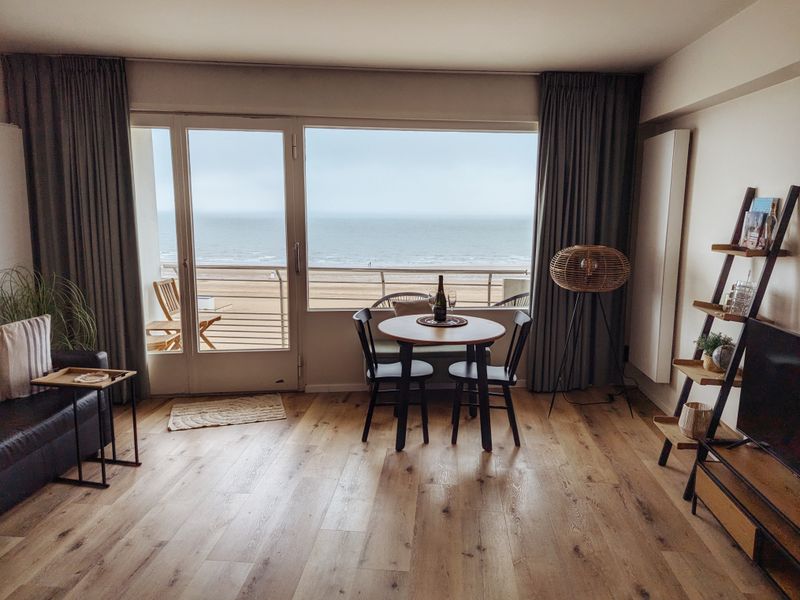
A cozy living room in a beachfront apartment with a stunning ocean view, featuring modern
The tips below apply to Airbnb and to most similar rental platforms.
Step 1: Check the Host and the Listing
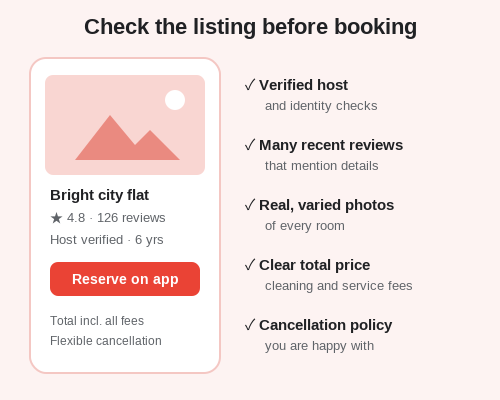
A few checks before you reserve
- Look at the host's profile: verified identity, how long they've hosted, response rate, and reviews from other guests.
- Prefer listings with many recent reviews. New listings aren't necessarily bad, but they carry more uncertainty.
- Read reviews for specifics: cleanliness, accuracy of photos, noise, check-in, and how the host handled problems.
- Study the photos. Look for pictures of every room, including the bathroom and kitchen. Very few photos or only close-ups can be a warning sign.
- Check the exact location after booking, and the general area before. Read what reviews say about the neighbourhood and transport.
Step 2: Understand the Total Price and House Rules
- Compare the total price, including cleaning fees, service fees, and taxes. For short stays, fees can make a rental more expensive than a hotel.
- Read the cancellation policy carefully. Policies range from flexible to strict, and refunds depend on it.
- Check house rules, such as check-in times, guest limits, quiet hours, and pets.
- Note check-out tasks. Some hosts ask guests to take out rubbish or start the dishwasher; make sure you're comfortable with this.
- Check accessibility details such as stairs, lifts, and parking if they matter to you.
Ask questions before booking
Use the platform's messaging to ask about anything unclear, such as whether the space is shared, how check-in works, or what the noise is like. A quick, clear reply is a good sign; keeping all messages on the platform also protects you if there's a dispute.
Step 3: Pay and Communicate Only on the Platform
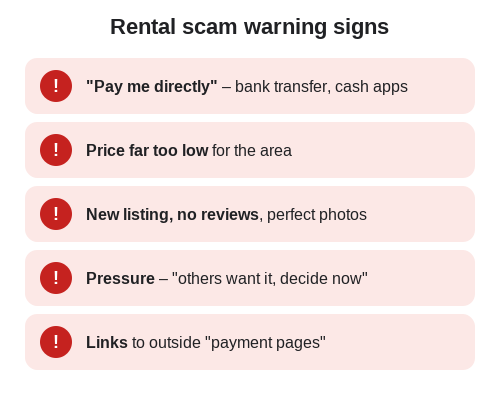
Most rental scams try to move you off the platform
- Be suspicious of any host who asks you to email, message, or pay them directly.
- Check that payment pages are on the platform's real website or app.
- Be cautious of prices far below similar listings in the same area.
- Don't share copies of your ID by email with hosts; platforms have their own verification.
Step 4: Stay Safe During Your Stay
- Share your address and plans with someone you trust.
- Check safety features on arrival: smoke alarm, carbon monoxide alarm where relevant, fire exits, and a first-aid kit.
- Look around for cameras. Platforms generally require hosts to disclose security cameras, and many prohibit them in private spaces such as bedrooms and bathrooms. Report anything that breaks the rules.
- Take photos on arrival of any existing damage, and report it to the host through the platform.
- Lock doors and windows, and keep valuables out of sight.
If Something Goes Wrong
If the place doesn't match the listing, isn't clean, or you can't get in, message the host on the platform right away and take photos or videos. If it isn't resolved quickly, contact the platform's support team. Most platforms have rules about refunds or rebooking when a listing is significantly different from what was described, but you usually need to report problems promptly, often within a set time of check-in.
Your safety comes first
If you ever feel unsafe, leave and go somewhere secure, and contact local emergency services if needed. Sort out refunds afterwards.
If a rental doesn't suit your trip, our guide on finding budget hotels covers other good-value options.
A Pre-Booking Safety Checklist
Before you press "Reserve", run through this quick checklist. It takes about ten minutes and helps you avoid the most common problems with holiday rentals.
- Location check: look up the address area on a map, check the distance to public transport, and use street view to see what the neighbourhood looks like.
- Photos match reality: do a reverse image search on one or two listing photos. If they appear on unrelated websites, the listing may be fake.
- Recent reviews: read reviews from the last few months, not just the overall rating. Look for comments about cleanliness, noise, check-in, and whether the property matched the description.
- Safety features: check the listing for smoke alarms, carbon monoxide alarms, a first-aid kit, and a fire extinguisher. Message the host if they aren't mentioned.
- Accessibility: ask about stairs, lifts, and parking if they matter to you, especially with young children, older relatives, or heavy luggage.
- Cancellation policy: read it carefully, and consider travel insurance that covers accommodation if your plans might change.
- Local rules: some cities limit short-term rentals. A listing that seems to break local rules may be cancelled at short notice.
When you arrive, take a few minutes to note the exits, test that doors and windows lock, find the fuse box and water stopcock, and save the local emergency number in your phone. If anything looks unsafe or seriously different from the listing, take photos and contact the platform straight away, before you settle in. Platforms usually ask you to report problems within a short time after check-in to qualify for help with rebooking or refunds.
When you leave, follow the host's checkout instructions, take photos of the property's condition, and keep all messages within the platform in case of any later dispute.
Final Thoughts
Booking a holiday rental safely comes down to a few habits: choose well-reviewed listings and verified hosts, understand the full price and rules, keep all payments and messages on the platform, and report problems quickly. Do that and you can enjoy the extra space and local feel that rentals offer, with far less risk.