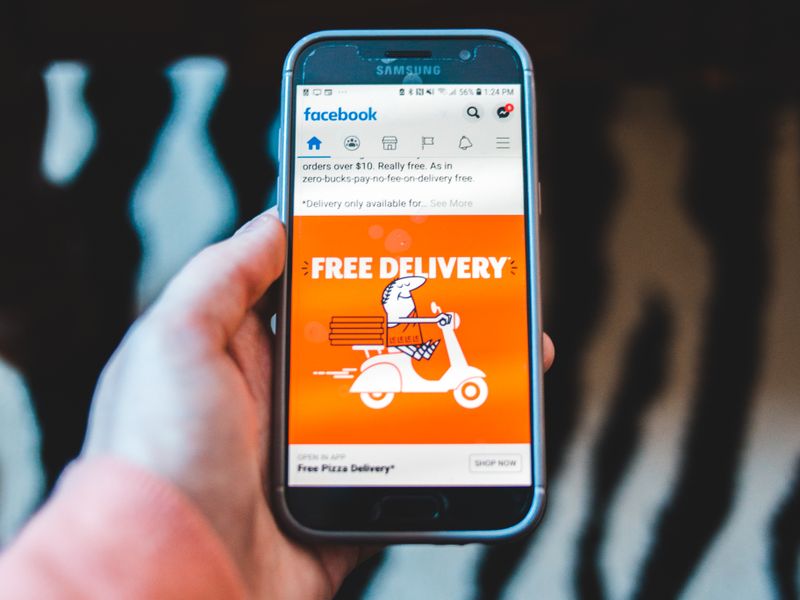
Hand holding a smartphone displaying a Facebook ad for free delivery
This guide explains how ad platforms are organised, how to set up a first campaign, what makes an ad work, and how to measure and improve results. Exact menus differ between platforms and change often, but the principles stay the same.
Before You Spend: Get These Ready
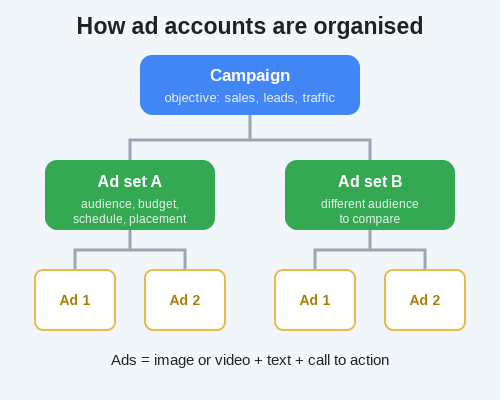
Campaign, ad set, and ad
- A clear offer: what exactly are you promoting, and why should someone act now?
- A landing page that matches the ad, loads fast on phones, and makes the next step obvious.
- Tracking: install the platform's tracking pixel or conversion tool on your website, following its consent requirements, so you can see which ads lead to sales or sign-ups.
- A business ad account set up separately from your personal profile.
- A test budget you're comfortable spending while you learn.
Step 1: Understand the Campaign Structure
Most major platforms use three levels:
- Campaign: where you choose your objective, such as awareness, traffic, leads, or sales. The platform optimises delivery towards this goal, so choose the one that matches what you really want.
- Ad set (or ad group): where you set the audience, budget, schedule, and placements.
- Ad: the creative people actually see: image or video, text, headline, and call-to-action button.
Step 2: Choose Your Audience and Budget
1
Start With a Focused Audience
Use location, age range, language, and interests that genuinely match your customers. For local businesses, location radius matters most. Avoid stacking too many narrow filters; platforms often find buyers better with a reasonably broad audience and good creative.
2
Use Your Warm Audiences
People who've already visited your website or engaged with your page are more likely to buy. "Retargeting" them with a reminder or offer is often the most cost-effective ad you can run. Customer list uploads must follow privacy laws and platform rules.
3
Set a Daily or Lifetime Budget
Start modestly and run each test for at least several days, so the platform's delivery system has time to learn. Avoid changing settings every day, which resets learning.
Step 3: Create an Ad People Stop For
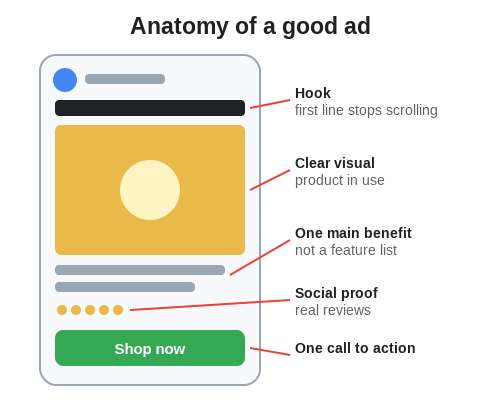
Every part has one job
- Lead with a hook: the first line should speak to a problem or desire, such as "Tired of patchy Wi-Fi upstairs?"
- Use real, clear visuals: the product in use or a satisfied customer usually beats generic stock images. Short vertical videos often work well on mobile.
- Focus on one benefit, not a list of features.
- Add social proof: star ratings, short reviews, or numbers of customers served.
- One clear call to action: "Book now," "Get a quote," "Shop the sale."
- Be honest: exaggerated claims, fake urgency, or misleading before-and-after images can get ads rejected and damage trust.
Step 4: Measure, Test, and Improve
- Click-through rate (CTR): how many people who saw the ad clicked it. Low CTR usually means the hook or image isn't working.
- Cost per result: what you pay for each lead or sale. This is the number that matters most for most businesses.
- Conversion rate: how many visitors took action on your landing page. Low conversion often means the page, price, or offer needs work.
- Return on ad spend (ROAS): revenue divided by ad cost.
Test one change at a time, such as two different images with the same text, so you know what caused the difference. Turn off ads that clearly underperform and put more budget into winners gradually.
Follow advertising rules
Platforms have policies on topics like health claims, finance, alcohol, and before-and-after images, and many countries have advertising standards. Read the policies before launching to avoid rejected ads or account restrictions.
Pre-Launch Checklist for Your First Ad
- The campaign objective matches your real goal (sales, leads, or visits).
- Tracking is installed and tested, so you can see conversions.
- The landing page loads quickly on a phone and matches the ad.
- The audience location, age, and language are correct.
- The budget and end date are set, so spending can't run away.
- You have at least two ad versions to compare.
- The ad follows the platform's advertising policies.
- You know your maximum acceptable cost per sale or lead.
Check results after a few days, but avoid making big changes too quickly. Most platforms need some time and data before results stabilise.
Common Mistakes That Waste Ad Budget
Most beginners lose money on ads for the same handful of reasons. Avoiding them helps your budget go much further.
- Targeting too broadly: "everyone aged 18 to 65" rarely works for small businesses. Start with a clear customer profile and location.
- Sending traffic to the homepage: link each ad to the most relevant page, such as the product or booking page mentioned in the ad.
- Changing ads too often: platforms need a few days and some results to learn. Avoid editing a campaign every few hours.
- Ignoring mobile users: most people see ads on phones. Check that your images, text, and landing pages look good on small screens.
- No tracking: without tracking, you can't tell which ads lead to sales. Set up the platform's tracking tools and your website analytics before launch.
- Boosting posts without a goal: boosted posts may get likes, but not necessarily customers. Choose campaign objectives that match what you want, such as sales or enquiries.
- Breaking advertising rules: misleading claims, before-and-after images in some categories, and restricted products can get ads rejected or accounts suspended. Read each platform's advertising policies.
Set a monthly maximum budget you're comfortable losing while you learn, and review results weekly. If a campaign isn't working after a fair test, pause it and try a different audience, image, or offer rather than simply spending more.
Final Thoughts
Successful social media ads start before the ad itself: a clear offer, a matching landing page, and proper tracking. Then choose the right objective, a sensible audience, and an honest, eye-catching creative. Test small, measure cost per result, and scale only what works.