A smartphone stands on a desk displaying a 2023 calendar, with a plant in the background
This guide helps you build a simple, reliable toolkit, set up a daily workflow, and use apps in a way that actually saves time instead of creating more work.
Step 1: Build a Minimal Toolkit
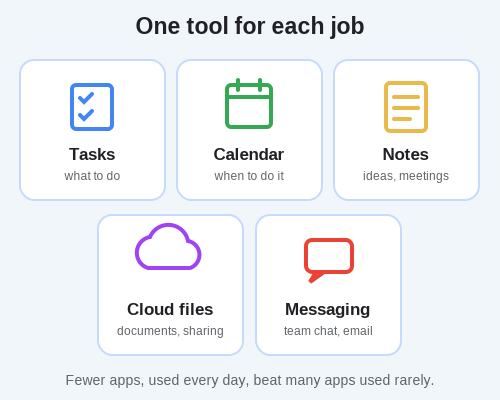
A small, focused toolkit
Most people need just one tool for each of these jobs:
- Task manager: a single trusted list of everything you need to do, with due dates. Options range from simple to-do apps to project boards.
- Calendar: for appointments and blocks of time to do important work.
- Notes: for ideas, meeting notes, and reference information, searchable from any device.
- Cloud storage: for documents, with a clear folder structure and sharing.
- Communication: email and, for teams, one chat tool.
Many suites, such as Google Workspace or Microsoft 365, cover most of these in one place, which reduces switching. Whatever you choose, make sure it syncs across your phone and computer.
The one-list rule
Keep all tasks in one place. Tasks scattered across sticky notes, emails, chat messages, and three apps are easy to forget, and searching for them wastes time.
Step 2: Set Up Your Apps Properly
- Create a few broad lists or projects, such as Work, Home, and Someday, rather than dozens of categories.
- Use due dates only for real deadlines; fake deadlines quickly become ignored.
- Add the app to your phone's home screen and set up quick capture, such as a widget or keyboard shortcut.
- Turn off non-essential notifications so apps help you focus rather than interrupt you.
- Connect tools where useful, for example turning starred emails into tasks or adding calendar events from your task app.
Step 3: Follow a Simple Daily Workflow
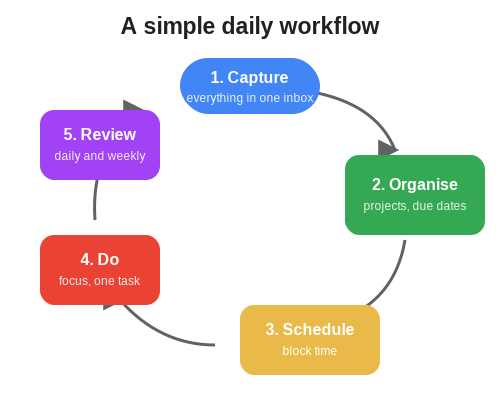
Tools only work inside a routine
1
Capture
Whenever a task or idea comes up, add it to your inbox list immediately. Don't organise yet, just capture it so your mind can let go.
2
Organise
Once a day, sort the inbox: add due dates, move items to the right project, delete what doesn't matter, and do anything that takes under two minutes.
3
Schedule
Choose your top three tasks for the day and block time for them in your calendar. See our guide on managing time effectively.
4
Do and Review
Work through tasks with focus, tick them off, and end each day with a five-minute review. Once a week, do a longer review of all projects.
Step 4: Use Apps Well in a Team
- Agree where things live: tasks in the project tool, files in shared storage, quick questions in chat, formal decisions in email or documents.
- Assign every task to one person with a clear due date.
- Keep shared folders tidy with consistent file names, such as "2025-03 Client Name Proposal v2."
- Respect focus time: set expectations for response times so chat doesn't become constant interruption.
- Protect data: use strong unique passwords, two-factor authentication, and correct sharing permissions.
Step 5: Avoid Common App Traps
- App-hopping: switching tools every few weeks means you never build the habit. Give a system at least a month.
- Over-organising: complex tags, colours, and nested folders take more time than they save.
- Endless lists: a 200-item list is demoralising. Move "maybe one day" ideas to a separate list.
- Notification overload: productivity tools can become distraction tools.
- Paying too soon: start with free plans and upgrade only when you need a specific feature.
Keep Your Apps and Data Secure
- Use a password manager and a unique, strong password for every app.
- Turn on two-factor authentication wherever it's offered, especially for email and cloud storage.
- Review sharing settings regularly so documents aren't open to "anyone with the link" unless intended.
- Remove access for people who leave your team straight away.
- Back up important files and check that you can restore them.
- Install updates promptly, since they often fix security problems.
A few minutes spent on security protects the time you saved with your productivity tools, and your customers' trust.
How to Choose the Right App
With thousands of productivity apps available, choosing can itself become a distraction. Use these questions to decide quickly:
- What problem am I solving? Missed deadlines, scattered notes, or poor team communication each need different tools.
- Does it work on all my devices? An app you can use on your phone and computer, with reliable syncing, is easier to keep using.
- Is it simple enough? Choose the simplest tool that meets your needs. Complex apps often end up unused.
- Does it integrate with tools I already use? Calendar, email, and file storage connections save time.
- What happens to my data? Check where data is stored, whether you can export it, and the company's privacy policy.
- What does it cost over time? Free plans may limit features or users. Compare the yearly cost for your needs.
Give a new app a fair trial of two to four weeks before deciding. Use it for real work, not just test tasks. If it doesn't fit, export your data and move on without guilt. The goal is to get work done, not to find the perfect tool.
For teams, involve colleagues in the decision. A tool chosen together, with simple agreed rules for how to use it, is far more likely to be adopted than one imposed without explanation. Provide a short guide or training session, and nominate someone to answer questions in the first few weeks.
Finally, review your toolkit once or twice a year. Cancel subscriptions you no longer use, and check whether newer features in your existing apps could replace a separate tool.
Final Thoughts
The best productivity system is simple enough to use every day. Pick one tool per job, keep all tasks in one list, follow a daily capture-organise-schedule routine, and review weekly. Once the habit is in place, apps genuinely give you back time.