
Flat lay of a well-organized workspace featuring a laptop, candle, eucalyptus leaves, and
This guide gives you a straightforward system that works on paper, in a simple app, or on a team project board.
Step 1: Capture Everything in One Place
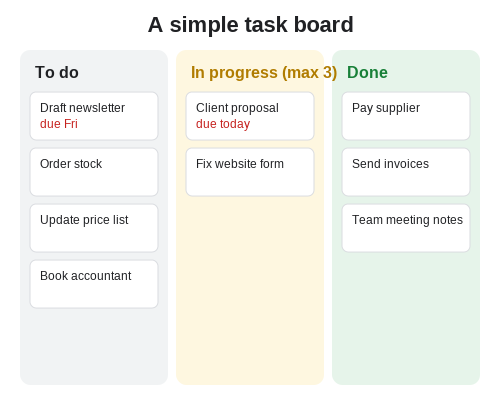
See all your work at a glance
Start with a "brain dump": write down every task, request, and idea you're carrying, from big projects to small reminders. Then make one place your trusted inbox for anything new: a notebook, a single task app, or a project tool. If tasks arrive by email or chat, move them into this list instead of leaving them where they landed.
Step 2: Break Projects Into Next Actions
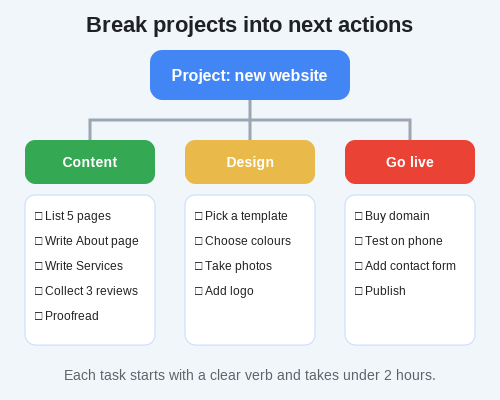
Big goals become small, clear steps
- Split each project into milestones, such as content, design, and go-live.
- Break each milestone into small tasks that start with a verb: "write the About page," "email three suppliers for quotes."
- Aim for tasks you could finish in a single sitting, roughly under two hours.
- Always know the next action for every active project.
Step 3: Prioritise and Add Dates Carefully
- Mark true deadlines with due dates, and use start dates or a "this week" list for everything else.
- Rank by impact: which tasks move your most important goals forward?
- Consider dependencies: tasks that unblock other people should usually come first.
- Choose three main tasks each day, plus a short list of small items.
The urgent-important matrix is a quick way to decide what to do, schedule, delegate, or drop.
Step 4: Use a Task Board and Limit Work in Progress
A simple board with three columns, To do, In progress, and Done, shows exactly where everything stands. Move each card across as work moves forward. This method, often called Kanban, works on a whiteboard with sticky notes or in many free project apps.
- Limit work in progress: allow only two or three tasks "in progress" at once. Finishing beats starting.
- Add a "Waiting" column for tasks blocked by someone else, with a note of who and when you asked.
- Keep cards specific, with an owner and due date for team boards.
Step 5: Organise Tasks in a Team
- One owner per task: shared responsibility often means nobody does it.
- Clear definition of "done": describe what finished looks like, such as "approved by the client and uploaded."
- Short regular check-ins: a 10–15 minute weekly or daily meeting around the board to spot blockers.
- Write decisions down in the task itself so information isn't lost in chat threads.
Step 6: Review and Clean Up Weekly
Once a week, go through every list: clear the inbox, update due dates, delete tasks that no longer matter, move "someday" ideas to a separate list, and confirm the next action for each project. A system you don't review slowly stops being trustworthy, and then stops being used.
Keep it simple
The best task system is the one you actually use. A paper list reviewed every day beats a complex app you open once a week.
Choosing the Right Format for Your Tasks
- Paper notebook or planner: simple, distraction-free, and great for personal daily lists.
- Simple to-do app: good for individuals who want reminders and access across devices.
- Kanban board app: ideal for visual workflows and small teams.
- Project management tool: useful for larger teams with dependencies, timelines, and shared files.
- Shared spreadsheet: a flexible option for simple trackers when everyone already uses spreadsheets.
Start with the simplest option that meets your needs. You can always move to a more powerful tool once your process is clear; moving a messy process into a complex tool rarely fixes it.
Example: Organising a Busy Week
Here's how the steps in this guide might look in practice for someone with a full workload.
- Monday morning, 20 minutes: empty all inboxes, notes, and messages into one task list. Break the big "launch new website" project into next actions: "email designer about homepage draft", "collect product photos", "write About page".
- Prioritise: mark three tasks as this week's top priorities and add real deadlines only where they exist.
- Plan the week: block two 90-minute focus sessions for writing, and one hour on Wednesday for meetings and calls.
- Daily routine: each morning, choose three tasks for the day from the list; each evening, tick off what's done and move unfinished items.
- Friday review: clear the inbox, check project progress, delete tasks that no longer matter, and plan the next week's priorities.
This routine takes about an hour a week in total but saves far more by reducing forgotten tasks, last-minute panics, and time spent wondering what to do next.
If you manage a team, share the board or list so everyone can see priorities, owners, and deadlines. Agree simple rules, such as updating task status before the weekly meeting, to keep information current without extra effort.
Remember to protect time for unexpected work. Leaving around 20 percent of your week unplanned gives you room for urgent requests without derailing your priorities.
Over time, notice which kinds of tasks you consistently underestimate. Many people underestimate writing, meetings, and tasks that depend on others. Adjust your plans to reflect reality, and your schedule will become far more dependable.
Whatever system you choose, keep it in one trusted place. When tasks are scattered across sticky notes, emails, chat messages, and memory, things get missed. Capturing everything in a single list or board, and checking it daily, frees your mind to focus on doing the work rather than trying to remember it all.
Final Thoughts
Organised work starts with one trusted list, clear next actions, and honest priorities. Use a simple board, limit how many tasks you juggle at once, keep team responsibilities clear, and review every week. You'll spend less energy remembering and more on doing great work.