
A photographer working at a creative setup with a laptop and Wacom tablet, focused on
You don't need years of experience to build one. You need a few well-chosen pieces, explained clearly, in a format that's easy to share.
Step 1: Decide Who It's For
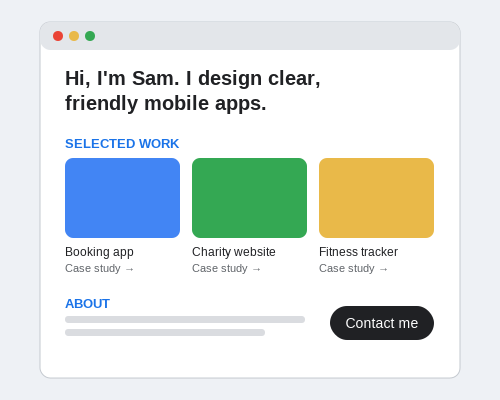
Simple, focused and easy to navigate
Think about the jobs or clients you want. A portfolio for a UX design role should look different from one for a copywriting client. Look at job adverts and portfolios of people already doing that work, and note what they show. Then build yours to answer one question: "Can this person do the work we need?"
Step 2: Choose Your Best Work
- Quality over quantity: three to six strong pieces beat twenty average ones.
- Relevant first: put the work closest to the job you want at the top.
- Show range carefully: include different types of work only if they're relevant.
- Use personal projects: if you lack paid work, create self-directed projects, redesigns, or volunteer work.
Respect confidentiality
Some client or employer work is confidential. Ask permission before sharing it, remove sensitive details, or describe the project without showing private material. Always be clear about which parts you personally did on team projects.
Step 3: Explain Each Project With a Short Case Study
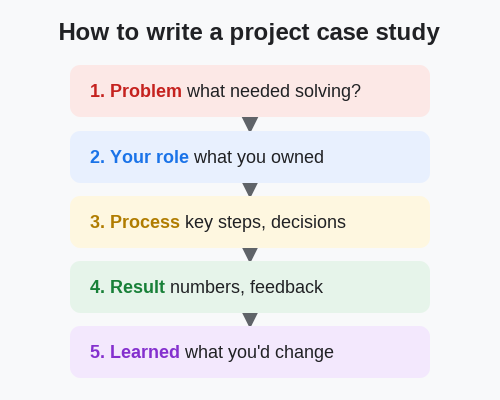
Tell the story behind the work
- The problem: what needed to be solved, and for whom
- Your role: what you were responsible for
- The process: key steps, decisions, and why you made them
- The result: outcomes, numbers, or feedback where possible
- What you learned: what you'd do differently next time
Keep it scannable: short paragraphs, headings, and images or screenshots that support the story.
Step 4: Pick the Right Platform
Personal website
- Most professional and flexible
- Website builders make it easy
- A custom domain looks polished
Portfolio platforms
- Behance or Dribbble for designers
- GitHub for developers
- Quick to set up, built-in audience
PDF portfolio
- Useful for applications by email
- Keep it under about 10 MB
- Tailor it per application
Step 5: Add the Essentials
- A clear introduction: one or two lines saying who you are and what you do
- An about section: a short, friendly bio and your skills
- Contact details: email and links to LinkedIn or relevant profiles
- Your resume: as a link or downloadable file
- Testimonials: a few short quotes from clients, managers, or teachers, with permission
Step 6: Polish and Maintain It
- Check it on a phone as well as a computer
- Make sure every link works and images load quickly
- Proofread carefully; small errors undermine professional work
- Ask someone in your field for honest feedback
- Update it every few months, replacing older pieces with better ones
What to Include, Field by Field
Designers
- Brand identities, posters, app or web screens
- Sketches and process, not just final images
- Before-and-after redesigns
Developers
- Live demos and GitHub links
- Clear README files
- Notes on tech used and problems solved
Writers and marketers
- Published articles or campaigns with links
- Results such as traffic or sign-ups
- A range of formats: blog, email, social
Teachers, photographers, architects, and many trades can benefit from portfolios too, such as lesson plans, photo series, project photos, or before-and-after work records.
Example: A Short Case Study
Booking Page Redesign for a Local Gym
Problem: Members found the class booking page confusing on phones, and many booked by phone call instead.
My role: I redesigned the mobile booking flow as a volunteer project.
Process: I watched five members try to book a class, noted where they got stuck, sketched three layouts, and tested the simplest with the same members.
Result: The new page cut booking from six steps to three. The gym reported fewer booking calls in the first month.
What I learned: Watching real users for 20 minutes revealed more than my own assumptions.
That's around 120 words, short enough to read in under a minute, yet it shows thinking, process, and impact.
No Clients Yet? How to Create Portfolio Work
- Self-initiated projects: solve a real problem you notice, such as an app for your sports club's schedule.
- Redesigns: improve an existing website, menu, or app, clearly labelled as a personal concept.
- Volunteer work: help charities, schools, or community groups with real briefs.
- Course projects: include your best assignments, ideally expanded beyond the minimum.
- Challenges: join design or coding challenges that give you a brief and a deadline.
Share Your Portfolio Effectively
A great portfolio only helps if the right people see it. Make it easy to find and easy to view.
- Add the link everywhere: your CV, email signature, professional networking profiles, and job applications.
- Use a short, professional web address: ideally your name, so it's easy to remember and type.
- Prepare a PDF version: some employers prefer attachments. Keep a compact PDF of your best three to five projects under a reasonable file size.
- Tailor for each application: put the most relevant projects first, or create a short version for a specific job.
- Check it on a phone: recruiters often open links on mobile. Make sure images load quickly and text is readable.
- Get permission: only include client or employer work you're allowed to share. Remove confidential details or create anonymised versions.
Ask two or three people in your field to review your portfolio before you share it widely. Fresh eyes spot unclear descriptions, weak projects, and typos you've stopped noticing. Then, in interviews, be ready to talk through one or two projects in detail: the problem, your role, the decisions you made, and the result.
Final Thoughts
A professional portfolio is your work's best advocate. Choose a few relevant pieces, explain how you approached them, and make it easy for people to contact you. Start small today; you can always improve it as your work grows.