
Close-up of a woman using a graphics tablet to create digital art with a laptop
This guide explains what a good design course should teach, how to choose one that fits your goals and budget, and how to get the most out of it.
What You Should Learn
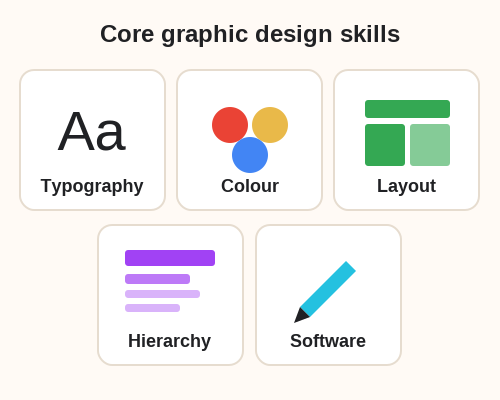
The skills behind every good design
Software changes, but design principles last. A solid course should cover:
- Typography: choosing and pairing fonts, spacing, and readability
- Colour: colour theory, contrast, and building palettes
- Layout and composition: grids, alignment, balance, and white space
- Visual hierarchy: guiding the viewer's eye to what matters first
- Branding basics: logos, style guides, and consistency
- Software skills: a raster editor, a vector tool, and a layout or web design tool
Key Point
Be cautious of courses that are only "how to use Photoshop" lessons. Tool skills matter, but employers and clients hire designers for their judgment, not just their software knowledge.
How to Choose the Right Course
1
Decide Your Goal
Are you designing for your own small business, starting a career, or adding a skill to your current job? A hobbyist may only need a short course, while someone aiming for a design job needs a structured programme with feedback and portfolio projects.
2
Check the Projects and Feedback
The best courses make you design real things, such as posters, logos, social media graphics, or a brand identity, and give you feedback from instructors or peers. Look at the course outline for practical assignments.
3
Look at the Instructor's Work
A good teacher should have a portfolio you can look at. If you like their work and they explain their decisions clearly in a free preview lesson, that's a good sign.
4
Read Recent Reviews
Check reviews from the last year or two, since software and course content change. Look for comments about feedback quality and whether learners finished with a portfolio.
5
Start Free, Then Invest
Try free introductions first, such as audit-mode university courses or free tutorials from design tool makers. If you enjoy it and want to go further, a paid course with mentoring can be worth the money.
Software: Free and Paid Options
You don't need expensive software to start. Many beginners learn on free tools and switch later if needed.
- Free options: Canva for quick layouts, Figma's free plan for interface and layout work, GIMP for photo editing, Inkscape for vector graphics
- Industry-standard paid tools: Adobe Photoshop, Illustrator, and InDesign, often discounted for students
- Hardware: any reasonably modern computer works for most beginner projects; a graphics tablet is optional
Get the Most Out of Your Course
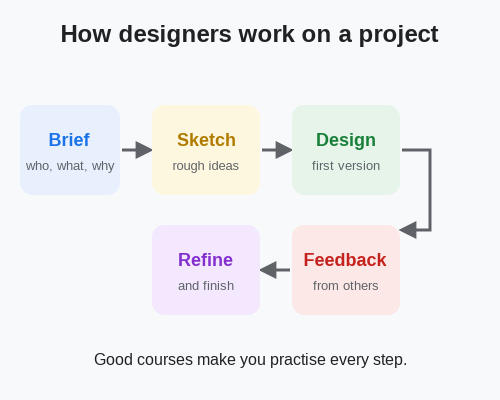
Practise the full design process
- Redesign real things you see every day, like menus, flyers, or app screens.
- Copy great designs for practice (privately) to understand how they work, then create your own versions.
- Ask for feedback in course forums or design communities, and listen without getting defensive.
- Keep a sketchbook for ideas before you touch the computer.
- Save your best work as you go, so you're building a portfolio from day one.
Respect copyright
Use only fonts, images, and icons that you have the right to use, such as properly licensed or free-for-commercial-use assets. Never present someone else's design as your own in a portfolio.
Four Design Principles to Practise From Day One
Even before your course reaches them, you can start noticing and applying these four basic principles. They explain why some designs instantly feel "right" and others feel messy.
- Contrast: make important things clearly different, through size, colour, or weight. A headline should look nothing like body text. Weak contrast makes everything blend together.
- Alignment: line elements up with each other along clear edges. Random placement looks careless; aligned elements look organised and intentional.
- Repetition: reuse the same fonts, colours, and styles throughout. Consistency builds a recognisable look and helps people know what to expect.
- Proximity: group related items together and separate unrelated ones with space. A date, time, and place for an event belong in one group.
Quick exercise
Find a cluttered flyer or menu, take a photo, and list which of the four principles it breaks. Then redesign it using only two fonts and two colours. This one exercise teaches more than hours of watching videos.
Five Beginner Projects to Build Your Portfolio
1
An Event Poster
Design a poster for a real or imaginary event. Focus on hierarchy: the event name, date, and place should be readable from a distance.
2
A Logo and Mini Brand Guide
Create a logo for a local business idea, then a one-page guide showing the logo versions, colour palette with codes, and fonts. This shows you think about consistency, not just one image.
3
A Social Media Set
Design three to five matching posts for one campaign, sized correctly for the platform. Employers love seeing you can keep a style consistent across several pieces.
4
A Menu or Price List Redesign
Take a real menu (with permission if you'll publish it) and redesign it for readability. Show the before and after with notes on what you changed and why.
5
A Simple App or Web Screen
Design a sign-up screen or landing page in a free interface tool. Even a single well-thought-out screen shows you understand layout for digital products, a highly demanded skill.
Free vs. Paid Courses: What You Actually Get
Free courses
- Great for learning basics and trying the field
- Usually no personal feedback
- You must structure your own learning
- Certificates may cost extra or be unavailable
Paid courses and programmes
- Structured curriculum and deadlines
- Feedback from tutors or mentors
- Often include portfolio reviews and career support
- Quality varies widely; research before paying
Final Thoughts
The right online design course teaches you to see, not just to click. Choose one with real projects and feedback, practise every week, and save your best pieces. Within a few months you can have a small portfolio that shows exactly what you're capable of.