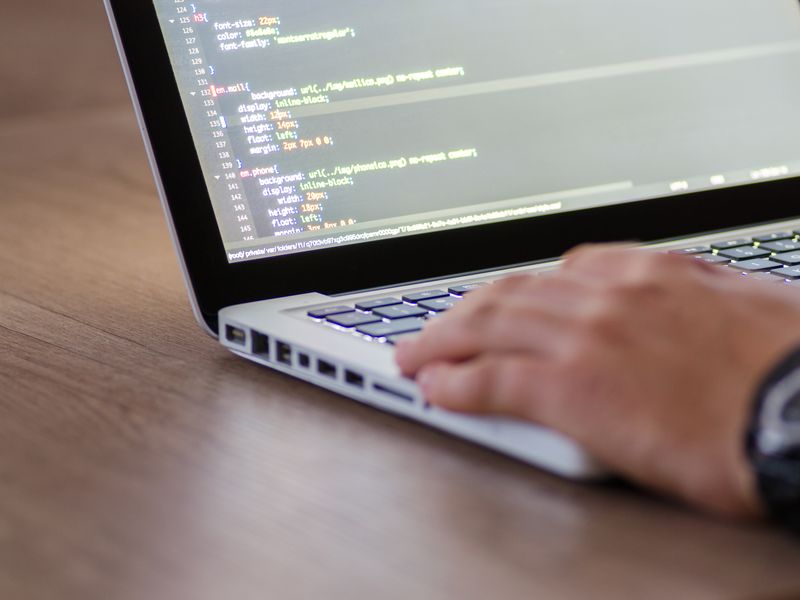
Person coding on a laptop with HTML code on screen
This roadmap walks you through choosing what to learn, where to learn it for free, and how to turn tutorials into real skills that you can show to others.
Start With a Goal, Not a Language
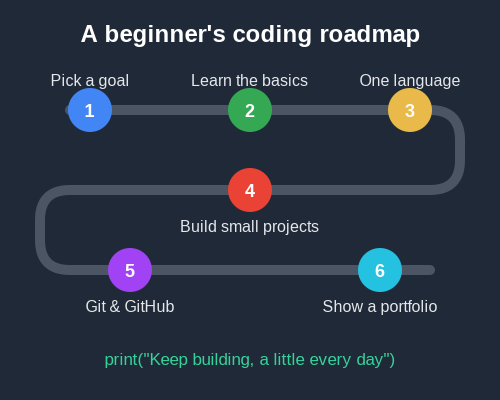
A simple path from zero to portfolio
"Which language should I learn?" is the most common beginner question. The honest answer depends on what you want to build:
Websites
- HTML and CSS for structure and style
- JavaScript for interactivity
Data and automation
- Python, known for its readable syntax
- SQL for working with databases
Mobile apps
- Kotlin for Android
- Swift for iPhone
Tip
If you really can't decide, start with Python or JavaScript. Both are beginner-friendly, widely used, and teach concepts that transfer to other languages.
The Best Free Places to Learn
- freeCodeCamp: a nonprofit with free interactive lessons, projects, and certifications in web development, Python, and data.
- The Odin Project: a free, project-based web development curriculum.
- CS50 from Harvard: a well-known introduction to computer science, free to audit online.
- MDN Web Docs: Mozilla's free reference and tutorials for HTML, CSS, and JavaScript.
- Official documentation: most languages, including Python, have free beginner tutorials on their official sites.
- Your library: many libraries give members free access to online learning platforms.
Your Step-by-Step Roadmap
1
Learn the Fundamentals
Every language shares core ideas: variables, data types, conditions (if/else), loops, functions, and lists or arrays. Spend your first few weeks getting comfortable with these. Type the examples yourself instead of copying and pasting.
2
Build Small Projects Early
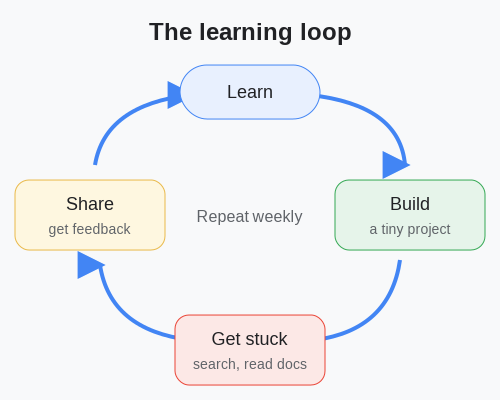
Learning sticks when you build
- A personal web page about yourself
- A to-do list or shopping list app
- A tip or budget calculator
- A small script that renames or organises files
3
Learn to Get Unstuck
Every programmer gets stuck daily. Practise reading error messages carefully, searching for them online, and checking the documentation. AI assistants can explain errors too, but try to understand the fix rather than pasting it in blindly.
4
Use Git and GitHub
Git tracks changes to your code, and GitHub lets you store projects online for free. Using them early builds a habit employers expect and gives you a public record of your progress.
5
Build a Simple Portfolio
Once you have three to five projects you're proud of, put them on a simple portfolio page with a short description of each: what it does, what you used, and what you learned. See our guide on building a professional portfolio.
How to Stay Motivated
- Code a little every day, even 20–30 minutes. Consistency beats long weekend sessions.
- Avoid "tutorial hopping". Finish one course before starting another.
- Join a community such as a local meetup or an online forum for beginners.
- Track progress by keeping a simple log of what you learned each day.
- Expect confusion. Feeling lost is a normal part of learning to code, not a sign you aren't cut out for it.
How long does it take?
It varies a lot. With regular practice, many people can build simple projects within two to three months. Becoming job-ready usually takes much longer, often a year or more, depending on the role and how much time you can give it.
Set Up Your Free Coding Tools
You don't need a powerful computer. Almost any laptop from the last several years can handle beginner programming. Here's a simple free setup:
- A code editor: Visual Studio Code is free, popular, and works on Windows, Mac, and Linux.
- A browser: Chrome or Firefox, with built-in developer tools for web projects.
- The language itself: install Python from python.org, or nothing extra for HTML, CSS, and JavaScript, which run in the browser.
- Git: free version control, plus a free GitHub account to store your projects online.
- No laptop? Free online code editors and school or library computers are enough to start learning.
A Sample 12-Week Beginner Plan
This plan assumes about one hour a day, five or six days a week. Adjust it to your pace; consistency matters more than speed.
1
Weeks 1–2: The Absolute Basics
Variables, data types, printing output, simple maths, and conditions (if/else). Write tiny programs every day, such as a temperature converter or an age calculator.
2
Weeks 3–4: Loops, Lists, and Functions
Learn to repeat actions with loops, store data in lists or arrays, and organise code into functions. Practise with small challenges, like finding the largest number in a list or counting vowels in a sentence.
3
Weeks 5–6: Your First Real Project
Build something small but complete without following a tutorial step by step: a quiz game, a to-do list, or a personal web page. Getting stuck here is normal and valuable.
4
Weeks 7–8: Go Deeper in Your Area
For web development, learn responsive layouts and how JavaScript changes a page. For Python, learn to read and write files and use a popular library. Start reading official documentation.
5
Weeks 9–10: Git and a Bigger Project
Learn the core Git commands (init, add, commit, push) and build a larger project, such as a weather app that uses a free public API or a small data analysis of a dataset you care about.
6
Weeks 11–12: Polish and Share
Improve your best two or three projects, write a README for each explaining what it does and how to run it, and publish them on GitHub or a simple portfolio page. Then pick your next goal.
How to Read an Error Message
Error messages look scary, but they're actually helpful clues. Take this Python example:
Example error
File "budget.py", line 7, in <module>
  print(totl)
NameError: name 'totl' is not defined- Where: the file name and line number (line 7) tell you exactly where to look.
- What type: "NameError" means Python doesn't recognise a name you used.
- The detail: 'totl' isn't defined, which is almost always a typo. Here it should be
total.
Read the last line first, then the line number. If you're still stuck, copy the error type and message (without your personal details) into a search engine; someone has almost certainly had the same problem.
Final Thoughts
Learning to code for free is completely possible. Pick a goal, choose one good resource, build small things often, and share your work. Progress will feel slow at first, then suddenly things click. The people who succeed aren't the smartest; they're the ones who keep going.